In this part of the raytracing adventure, we are expected to implement multisampling and distribution. Or as I’d like to call it: Accelerated just so we can decelerate. This was a shorter homework with very little issues. Most of the issues were me trying to add unrelated stuff.
Preparations
Before everything, I added the new features to my classes and to my parser such as sample number, aperture size, roughness, etc. This part is quite trivial yet starting with this made the progress in the other parts way easier. In the previous homeworks, it was so slow when I had to return to the parser and the classes to add certain attributes to everywhere necessary.
I also created a new class AreaLight which inherits from PointLight and has normal,size, area, u and v vectors as additional attributes. I also now get irradiance and light position from the functions getIrradianceAt and getPos, respectively. This way my original computecolor remains unaffected and during debugging I can easily pinpoint where the problem is.
I also adapted my “drawpixel” function:
for (i=0; i < cam.numSamples; i++)
{
   viewing_ray = computeViewingRay(x, y);
   colors.push_back(computeColor(viewing_ray, 0, air,
               cam.samplesLight[sampleIdxLight[i]]));
}

Color final_color = Filter(colors,cam.samplesPixel);
writeToImage(curr_pixel, final_color);
Sampling
The sampling is done within the camera class. The class initializes samples for pixels, camera, light, gloss and time all in the constructor (Currently it initializes these samples regardless if they are necessary). If there is only one sample, then all are initialized to 0,5.
Random Function: I used std::mt19937 and std::uniform_real_distribution as recommended in the homework pdf.
Sampling Function: I wrote a simple 2D sampling function. I also needed a 1D version for time. In both functions, following sampling types are implemented: Uniform, stratified, n rooks, multi jittered, random. By default I use multi jittered. The code for it is below:
case SamplingType::MULTI_JITTERED:
{
   std::vector<int> cols(numSamples);
   for (int i = 0; i < numSamples; i++) cols[i] = i;
   std::shuffle(cols.begin(), cols.end(),gRanGenC);
   std::vector<int> rows(numSamples);
   for (int i = 0; i <numSamples; i++) rows[i] = i;
   std::shuffle(rows.begin(), rows.end(), gRanGenC);
   real spacing = 1.0 / real(numSamples);
   for (int i=0; i < numSamples; i++)
      samples.push_back({
                     (rows[i]+getRandom())*spacing,
                     (cols[i]+getRandom())*spacing});
}
Sampling Application: The application is within the raytracerThread class of course. I hold index vectors with length numSamples for each sample array within the camera, except the aperture samples themselves. I then shuffle all the index vertices for every pixel.
ViewingRay: During the computation of the viewing ray I simply removed the previous 0.5 added to the x and y and replaced it with the x and y’s of the samples.
Filtering
I implemented two types of filters: box and Gaussian. By default, I use Gaussian.
I initially made it so that my standard deviation function would return a colour instead of a float. Yet I then realised summing the elements and returning a float resulted in nicer results.
Initially I thought filter was the easiest and once it worked, it would work flawlessly. Yet throughout my trials for the cases below, I found out that sometimes my standart deviation would be too small and its inverse would be too big (infinity). This resulted in black circles (especially in cornellboxes) in places where colour between samples were not really different. To fix this, I clamped the square of inverse standart deviation to be in [0.1,1.0].
Motion Blur
I’m really glad I started with motion blur because it was easy to implement as a starter.
Application of Motion Blur: Every motion blur object is stored as an instance together with a new attribute named motion which is a vector. I also added a has_motion flag in order to quickly check if we should apply motion or not. The application of motion is simple. I did not even change the original intersection and normal functions. Just changed the “getGlobal” and “getLocal” functions that are called by them. These functions now take time as a parameter. Below is an example:
Vertex Instance::getGlobal(Vertex v, real time) const
{
   if (has_motion && time > 0)
      return (Translate(motion*time)
             * (*forwardTrans)*Vec4r(v)).getVertex();
   else
      return ((*forwardTrans)*Vec4r(v)).getVertex();
}
At first I initialized it very simply, just a “time = getRandom()” line. I then applied the 1D version of various sampling types and it did make the result way less noisy.
Aperture
Then came the aperture. For this, I added a getPos function to the camera class, which returned the original position if it was a pinhole camera. I did not feel the need to add inheritance to the camera yet I might play with this idea later.
After the position was checked, came the manipulation of the viewing ray direction. For this purpose, if the aperture size was bigger than zero, I added these lines:
real tfp=cam.FocusDistance/dot_product(dir,cam.Gaze);
viewing_ray.dir = (cam.Position + dir * tfp)
                  - viewing_ray.pos;
This was the easiest part that needed the smallest amount of debugging for me. I just initially forgot to multiply by the aperture size while computing the camera position.
Area Light
Now this, this took the longest because I kept misunderstanding the logic. It is funny because while debugging I only had a couple of irradiance computing lines and that was it. Yet I still managed to spend hours debugging.
For arealight to work, I wrote a get ONB function first (while reading every step, please assume I did do something wrong and had to debug, it will be too much if I mention it every sentence). I then wrote the get position function. Then came the getIrradiance at function. It was so hard to get this function right. I also realized while separating the irradiance function, I mistakenly added the *cos_theta to this part instead of the actual diffuse and specular terms. This resulted in a brighter scene especially for point lights since for specular term, we do not actually multiply by cos_theta.
I also realised that the reference pictures had two-sided area lights and simply inverted the cos_light if it was negative. Didn’t think much of it.
Also, thanks to the arealight being visible on the cornellbox scene, I managed to see a flaw in my multi jittered sampling function because the light seemed warped and not square.
Glossy Surfaces
Oh this was a breeze after area lights. I just used the getONB function and wrote this simple function:
void Ray::shiftRayBy(std::array<real, 2> samples, real roughness)
{
   if (roughness != 0.0)
   {
      std::pair<Vec3r,Vec3r> onb = getONB(dir);
      Vec3r u = onb.first;
      Vec3r v = onb.second;
      dir = dir + ((v*(samples[0]-0.5) + u*(samples[1]-0.5)) *roughness);
   }
}
Because no human is without any mistakes, and apparently I’m as human as it gets, of course I managed to do this wrong as well. I initially called the ONB function with respect to the surface normal, not the direction of the ray, i.e. getONB(n). This did not cause any visible issues for meshes but the metallic sphere within the cornellbox seemed obviously off.
Results
Here is the tap 🙂 I did see some very slight differences in the water but it was so hard to track since the reference was a video. I’m not even sure whether I saw it wrong or not. I tried to turn the mp4 back into frames with the command below but I do not think it replicated it perfectly as there were artifacts and the pngs did not exactly correspond.
ffmpeg -i jsonFiles/hw3/outputs/tap_water/tap.mp4 jsonFiles/hw3/outputs/tap_water/tap_%04d.png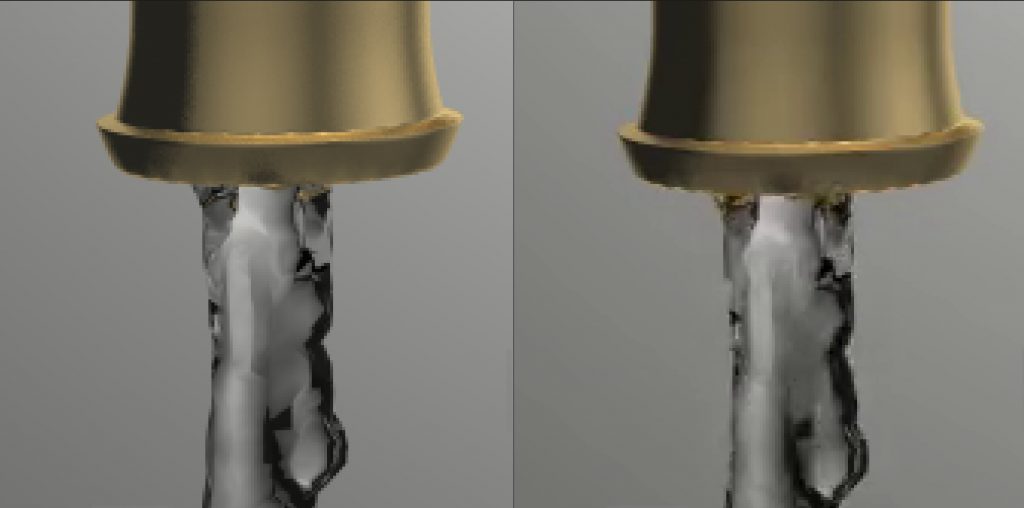
There seems to be slight difference at the mouth of the tap.

Above is the difference between my glass and the refernece, the one that is blacker in the bottom of the glass is mine.
Also, the other dragon also shows some dielectric issues:
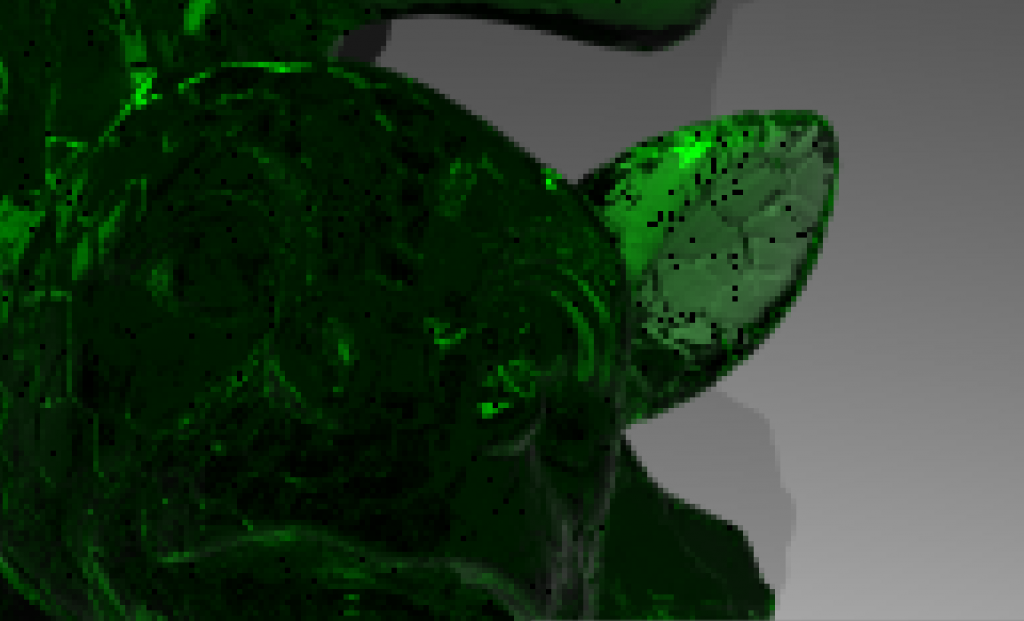
I tried to fix this problem, it is black beacuse of reaching the depth limit but could not really fix it. I am so tired of dielectrics but I guess I still need some debugging for them.
Final Notes
I have a few more things I want to do. First of all sometimes my mesh bvh build takes too long since initially I was working on object bvhes. I want to search for ways to make it faster. Moreover, I need to do a cleanup (as I always do after a submission). Other than that (and my dielectrics) I am currently really content with the way my code is. It is compartmentalized and very easy to develop.