In this part of the course, the whole point is to make the raytracer faster. I did not do as best as I could, but I realized that while writing this blog. I am also not going too hard on the optimization part to have a structurally sound and modular code, which does take most of my time :’). In total, I implemented bounding boxes, bvh, proper multithreading and back culling. There is also transformations and instancing, which is what I will be talking about first.
M4trix
I started with implementing my own 4×4 matrix and 4×1 vector functions and classes. My M4trix class holds a 4×4 double array and overloads multiple operators as well as having its own determinant, adjugate, inverse, transpose and Identitfy functions. At the beginning I made the mistake of only initializing diagonal values for the identity matrix, which led to me having garbage values for the rest.
I do not hold any 4×1 vectors, instead I create them only for matrix operations.
Transformations
The transformation class inherits from matrix. It has an extra m4trix for normal transform. Its functions are virtual gettransformationtype and virtual inverse.
The other transformation types inherit from transformation and implement the virtual functions.
- Rotate: axis (ray), angle (float)
- Translate: x,y,z (all float)
- Scale: center (vertex), x,y,z (all float)
- Composite (the one used the most)
For lights and camera, the transformations are directly applied at the parser. For objects, instances are created.
Transformations worked like magic, had no problems there.
Instancing
Instance inherits from object, so has its own get normal, check intersection and get object type functions. It also has a pointer to the original object, pointers to forward and backward transformations.
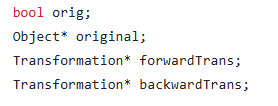
Both transformations and their normal transformations are computed at the initialization and are Composite by nature. I did not add a differentiation if there is a single type of transformation for the object or not, I precompute the forward and backward transformation together with normal transform matrices either way. The instances can be used for two cases:
- An object initially defined with transformations:
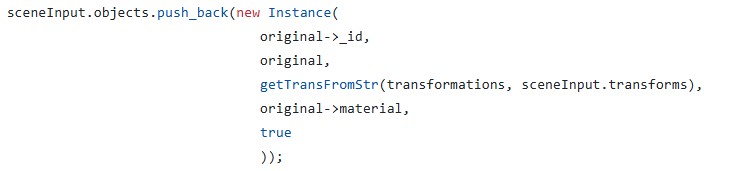
- This case is handled because instances can use the original object without transformations, so directly computing the transformed object and storing that requires adding the backward transformation of said object to the transformation of the instance. That is still doable yet the need to add new vertices for this purpose does raise a new memory problem, which is counteractive to the original idea of the instances.
- For this instances, we create a new object in the heap in constructor and delete it in the destructor. The original object is not within the objects deque. (Objects is now a deque to not have problems with referencing due to one-by-one addition of the instances)
- Mesh instances:

- For this case, if it says reset transformation, then the pointer points to the very first original object. If the transformation will not be reset, then the pointer points to that object with that id, regardless if it is an instance or not.
My main trouble was with parsing the instances and putting them into my scene struct. After that was done, since I had no issues with object rendering or transformations, there was no problem left. Also thanks to inheritance and my virtual functions, I did not even change any code in the original raytracerThread class.
Bounding Box
After I handled all the issues for instancing and transformations I then defined a new class: BBox. It has two vertices, vMax and vMin that holds the boundaries of an axis-aligned box, and three functions:
- Is within: To check if a vertex is within the bounding box.
- Intersects: To check if a ray intersects with the bounding box
- Get area: used for surface area heuristics.
I then added a bbox attribute to the object class. And for all intersection checks, it first checks if the ray intersects with the bounding box.
For instances, I automatically had two bounding boxes, one of the original (local) and one of the instance (global). This made local and global bounding box switches at bvh almost automatically.
The class also implements its own get global and get local functions for various structs.
BVH
Now that everything is ready, it is time to get faster. I wrote a BVH class that will create the linear node tree and traverse it. The way I did it is not the most optimized, I have to admit. I put meshes into the nodes. Yet still I got a very big improvement together with bounding boxes. I will continue to improve this part throughout other homeworks but this is how it is currently. Apparently, it is very easy to overlook such things when focused on meeting the deadline.
I had also wanted to try other acceleration structures, yet I did not have time to implement them before the homework deadline.
I did three ways of choosing the pivot: Middle, median and Surface Area Heuristics. As expected, SAH works the most efficient for now. (I later implemented triangle based BVH at the end of this blog to see the time)
I also only included intermediate nodes with two childs. If a node had one child, I recomputed with a new axis. If for all three axes the node still cannot be divided to two and objCount > maxObjCount, I divided it to two at the “start+maxObjCount”th index and continued.
Multithreading
I was already doing multithreading in my previous homework but it was row-based. I added a new function to be able to do it batch-based. My batches are 16×16 unless they exceed image resolution limits.
Now, I also had race conditions when I changed some functions without realizing and started to see black dots on the screen. This was due to my meshes holding the triangle id which they had intersected with when checkIntersection function was called. I thought making the scene constant would prevent such issues, but I forgot I was holding pointers to the meshes. I then fixed it by adding a triangle ID to my hit record and passing it as a parameter to getnormal. I do believe this can be handled better.
Fixing Other Issues
- Backward Culling: I had implemented backward culling in the previous homework, yet it needed to be improved. I now disable back culling for dielectrics and shadow testing for obvious reasons.
- Vertex Normal Computation: My code now checks if ply files have vertex normals in them, and if they do, automatically gets them and assumes smooth shading.
- Dielectrics: In the previous homework, I had issues with my dielectrics, turns out it was due to my very very flawed logic where I forgot to refract the reflections within the dielectric. I fixed that and it works perfectly now 😀
- Near plane taken as int: In the previous homework I also had a difference between my chinese dragon and the reference png in which my dragon would seem further away than it should be. Turns out I was taking near plane with std::stoi instead of std::stod.
- Makefile: Since my code got quite big with various files, I extended my makefile to only recompile the updated files. Currently, this does not work as well for me since I hold my configurations as macros in a header and my makefile is unable to update based on macro differences.
- Logger and Automatic file renderer: Now that we have too many files, there is no way I am giving all that arguments by hand. So I wrote a function to render every json file within a folder as well as a logger that writes the time + total time. It is a simple and quite uneffective logger, embedded within the main raytracer class (this class calls the raytracerthread classes) as I am only interested in logging the time and nothing else.
- Camera Scaling: For scaling I needed to update near distance by the scaling factor. I realized this after the submission, and I did not update my submission after the deadline so scaling doesn’t work in that code.
- Deoptimizing the code (?): I did make my code way worse (x3 worse) while trying to optimize it without realizing at one point. I learned that making bounding boxes more complex only makes it worse. I did optimize traversal but currently it does not have any effect since my traversals are quite minor due to mesh based traversal.
Results
I did not put any photos since it is not about the visuals mostly. Besides, my results are currently very close to the references, if not identical. Instead, here is my now public github repository and two videos: github.com/aysucengiz/CENG795
Youtube decided it would be shorts and not a normal video ¯\_(ツ)_/¯


Timings
Okay so just to be able to add it to the blog, I quickly implemented triangle based bvh for each mesh. I did this by adding a bvh to mesh class. I initialized it together with the mesh, and simply called the traverse function. The visuals are unaffected. This is not in the submitted code though, I just was too curious not to put it to the blog. I added the times like the following: (parse time) + (draw time)
Honestly, I did expect it to be very good but this left my jaw open. I was struggling to draw every scene within these past three days.
| Scene | Draw (old) | Draw (no triangle bvh) | Draw (yes triangle bvh) |
| Chinese Dragon | 0.015s + 21m 56s | 1.142s + 11m | 3.671s + 0.253s |
| Car Smooth | 0.014s + 37.4 s | 0.012s + 2.297s | 0.037s 0.286s |
| David | 0.149s + 5m 15 s | 0.273s+ 37 s | 0.273 s |
| Ton Roosendaal Smooth | 0.11s + 6m 1s | 0.096s + 50.025s | 0.283s + 0.308s |
| T-rex Smooth | 2.185 + 3h 48m | 1.577s + 1h 11m | 10.725s+ 0.717s |
| Other Dragon | 1.841s + 1h 46m | 2.191s + 33 m | 8.077s + 0.627s |
| Lobster | 1.276s + +8h | 1.264s + ~4h | 7.924s + 6.24s |