Designing the Structure
Before everything, I started with deciding the structure I would use to code. I took the previous homework’s code as a base and deleted everything but the bare bones. Then started adding homework requirements to the code. I decided on using the following arrays:
- gParticles: xy – coordinates, z – age
- gVelocity: xy – current velocity, zw – initial velocity
- gAttractors: xy – location, z – mass
I then wrote the functions regarding adding and removing attractors. I used a simple array logic where I hold the number of attractors as an integer and every attractor in the list with index bigger than number of attractor – 1 is not included in the velocity computation.
Compute Shader
After handling the initial requirements, I then moved on to the compute shader part. First of all, I changed the version to 4.3 since that was when the compute shaders were introduced.
For this part I mainly used the compute shader slides as a guide. However I did need to make some changes to make it work fully.
Initially I made the simple mistake of having two different buffers for the particles for both compute and vertex shaders. This did not work since the vertex shader is supposed to get the particles with the updated vertices. I did not pass the velocity or the attractor buffers to the vertex and fragment shaders since all I needed was the age and the positions for these shaders.
At this point I was still seeing nothing on the screen, I later found out the reason was 2 things:
- Depth: I was choosing the depth as 1.0, which was the deepest.
- Projection matrix: Naively, I thought I did not need it since we were working on 2D. I was suspicious as to how that would work and eventually decided on adding back the matrices but did figure out viewpoint and modeling matrices were unnecessary. The need to update the projection matrix at the reshape function gave a hint about its importance. I did a small researched and found out that I would need to make it orthographic, not projection.
After these changes, I started seeing something. This was the halfway point of my overall effort. For me, the process before seeing anything is always the hardest since there can be too many problems causing the black screen.
First Particles On Screen
By default, I chose the origin as the middle of the screen. Since the code for nearly everything was ready and needed debugging, this view is actually all the points on top of each other. Also, at this point I was initializing my projection matrix to have (0,0) right in the middle, thinking it would make it easier. I later made it from 0 to gWidth as that turned out to be easier for debugging.

I then tried to slide my origin to the side. And achieved the picture below instead. This very obviously shows a memory alignment issue.
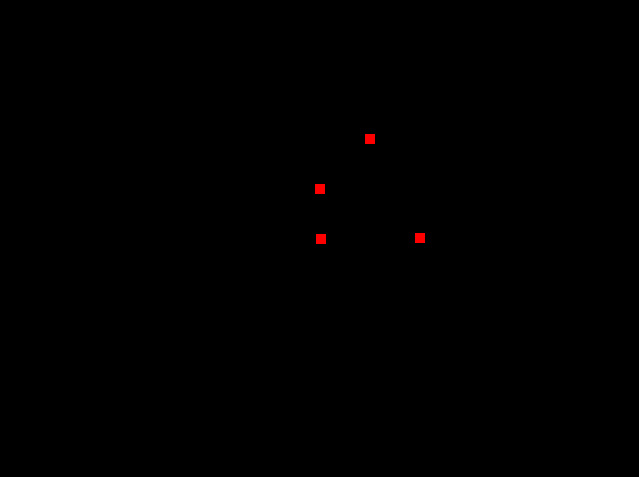
It was a simple problem, I had started to use a 4 member struct instead of 3 and thought I had changed it everywhere, but had forgotten

After changing that, every particle was on top of each other regardless of the origin. This meant I could start playing with the velocity computations. Initially, just adding the velocity meant nothing, it would still seem as a single point. To fix that, I initialized the age of the particles with 1.0 and decremented with their index until zero. I got the result below (I was also testing the delta time variable here).
This raised a question in my mind, wouldn’t it be too line-like if I did everything the same for the points except the ages? To prevent this I initialized every point with a randomized velocity vector and passed this initial velocity to the compute shader so that when a particle reaches the end of its lifespan, it will not loose the randomness.
Adding Attractors
I then started fixing the attractors, this was the point I changed the projection matrix back to a more usual choice, where (0,0) is at the top left. I added an attractor by default at (0,0).
Seems like everything (except text) was working, right? That was until I decided adding new attractors. Turns out I was magically expecting the compute shader to get the updated attractors array even if I only initialized the buffer once with an allocated and then deleted array and never touched it again. Needless to say I changed that and could start to add attractors. As default, I added four attractors to the points:

Slight randomization makes the initial view less box-like
Keyboard and Mouse
A slight tangent to mention the key bindings:
- Q: Closes the window
- W: Increases delta time
- S: Decreases delta time
- T: Toggles text
- R: Stops/starts particle movement
- G: Changes mouse mode
- V: toggles vsync
- F: Makes the window fullscreen (This was working a bit weird at the ineks, it would turn the whole monitor into a blackscreen for a while.)
- Mouse left button: adds a new attractor with the mass value on the screen to the clicked position or changes the origin to the clicked position.
- Mouse right button: Removes an attractor.
- Mouse scroll: Increases or decreases the to-be-added attractor’s mass
Particle Motion
This was the fun part. Before this, I added one+one blending to make the final result appealing. Initially dividing the velocity with dot(dist,dist) would result in a weird movement so for a while I had removed it. For a while I also had no limits for the delta time so the interesting visuals below were formed:
I then decided to use sqrt(dot(dist,dist)) and everything looked way more smooth, it was like a magical touch.
Particle Count vs FPS
I have an intel GPU.
| Particle Count | FPS (w/o vysnc) |
| 10^3 | 4900 |
| 10^4 | 4400 |
| 10^5 | 1900 |
| 10^6 | 220 |
| 10^7 | 22 |
Final Result
One thing I did not do was to make the resizing keep the proportions of the window, i.e. if the origin is at the middle it should still be in the middle of the window after the resize. This is not the case currently, the placements of the points do not change, they just wander to a bigger area. Video (sorry for the lack of video quality):